
In adventure mode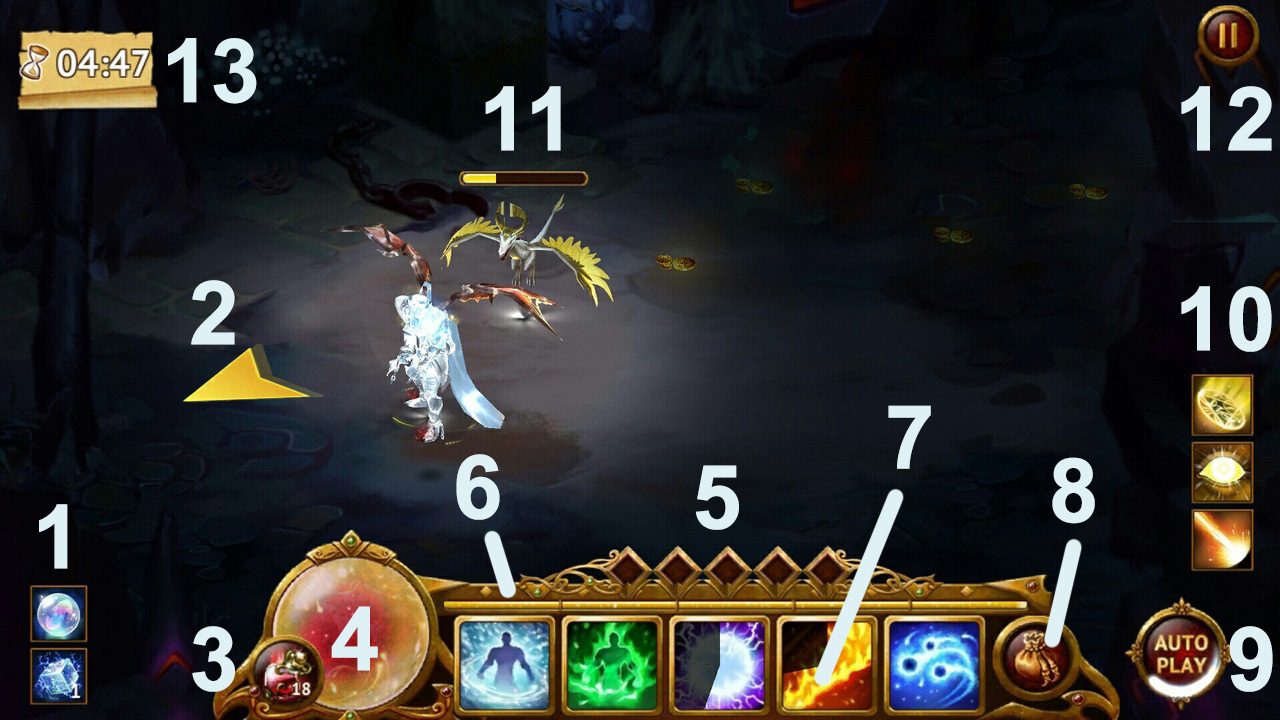
1 Active boosters/portions/guild banners/ set bonus
When you activate a booster, portion or guild banner they are shown here.
2 Cursor of movement direction
3 Health Potions
Tap this if you want to use your Potions. In AutoPlay – Potions will be automatically consumed when your HP is below 20%
4 Health Pool (HP)
This is the health of your character. When this drops to zero, you will die. Then you have a choice between returning to town, restarting the level or using diamonds to revive and continue where you left off will a full health tool.
5 Fury Charges Bar
Fury gets by critical attacks and using some skills. It spends using epic skills.
6 Experience Bar
The experience bar will increase as you kill enemies and when it gets full, your character will level up by 1 and the bar goes back to being empty.
7 Skill Bar
This is where your skills are placed. To use them you can just tap the icon, which will activate the ability. It must then cooldown (CD) before it can be used again. In AutoPlay, available skills (not on CD) will be used in the order of left to right.
8 Loot Bag/Inventory.
Tap this if you want to see what items you have in your inventory. You start off with 6 slots available and can upgrade to a maximum of 21 slots later.
9 Autoplay feature.
When you click this, the character will play itself, in the most basic manner. They will also use abilities that are of cooldown from the order of left to right.
10 Skills of hired Pet
These skills are used by your pet independantly.
11 Hired Pet and its Health Pool
12 Pause and Settings Button
13 Timer
It is used in some events or modes. If it shows zero you lose or win depending on locations mode.
Into the Town

1 Gold
Gold is the primary resource in Guild of Heroes and can be used to brew potions and to upgrade your equipment and abilities.
This shows how much current gold your character has.
2 Diamonds
Diamonds are the in-game premium currency that you can use to buy Chests, which contain random rewards, and you can use it to speed up Crafting. Diamonds are very useful and can be used for many things. This shows your character’s current Diamond total.
3 Mana
Mana is used for upgrading abilities. You can increase the amount of mana you can hold when you upgrade your jeweller, and you can find Mana Stones during quests, which can be dismantled for Mana.
4 Events Tab (Special Offer)
Tap here to access Daily Offers, which will offer discounts on Diamond purchases for a limited time. You can also view your Daily Sign In rewards, and join our Twitter here.
5 Event Tab
This tab is shown when there is an available event in the game.
6 Daily Quest and Achievements Tab
Here you can view your accomplished achievements. Completing these will award you Diamonds. You will also be able to review your Daily Quest here, which can be completed once a day to earn rewards.
7 Chat tab
Tap this and you can talk to other players that are online.
8 Рекламный сундук.
Тут можно просматривать рекламные ролики и получать за это золото и ману.
9 Премиум аккаунт.
Иконка отображает, сколько дней осталось Премиума.
10 Аватар нанятого напарника или питомца.
Отображает аватар нанятого игрока или вашего питомца, которые будут сражаться вместе с вами в локациях.
11 Иконки активированных бустеров, знамен и бонусов сета.
12 Количество зелий в наличии.
13 Иконка инвентаря.
14 Карта города и прогресс-бар уровня опыта.
15 Иконка скинов город. Скины города можно выиграть в различных ивентах.
16 Иконка настроек.
Comments
0 comments
Article is closed for comments.