

Runes are mysterious signs engraved on stones of a special shape, they contain the deep wisdom of the ancestors, and they give objects additional magical power.
The creation and improvement of runes is an ancient form of skill that is almost forgotten today, but fortunately, the rune master Aidan has arrived to Grayhaven. He is ready to teach the Hero to use the runes and reveal their incredible properties.
The rune master will become available after passing the second location of the "Forest" region.
Runes can be obtained from the Tower of Trials, Events or purchased from the Merchant in the city.
Inserting and extracting runes
When you have an item with rune slots and a rune of a suitable shape, you can improve the characteristics of this item by inserting the rune into the slot at the rune master.
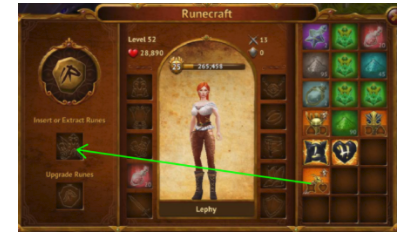
When you go to the Rune Master, you will get this menu shown above. Drag the equipment with the slots into the area where the green arrow is pointing.
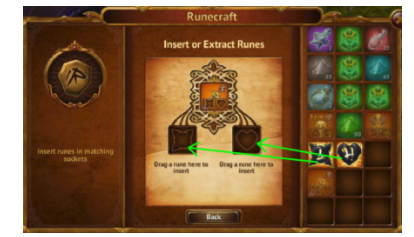
After the item has been placed, you will go into a new menu, where you are able to place the Rune into the appropriate Socket.
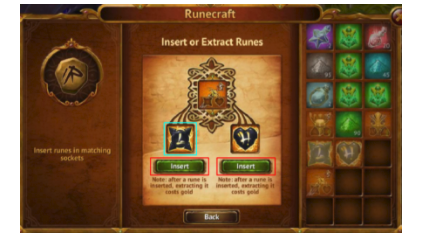
Once it is placed you can tap insert, if you want to upgrade the Rune in the item you can also tap on the Rune here.
You can extract runes by transferring a rune from an item to your inventory, or by tapping on it and pressing the "Extract" button in the rune information window.
Improving runes
At the Rune Master, you can also improve runes, even if they are already inserted into the item.
To improve the rune, you need to drag it to the appropriate slot on the left. The upgrade menu will open. If the rune is already in the item, then by dragging the item, you will see the corresponding upgrade button.
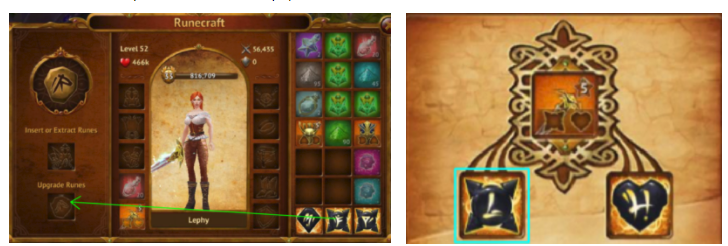
To upgrade a Rune, you can drag it into the ‘’Upgrade Runes’’ slot and it will bring you to the upgrade page. If the Rune is already Socketed to the equipment you can also tap the Socketed Rune and it will bring you to the upgrade page.
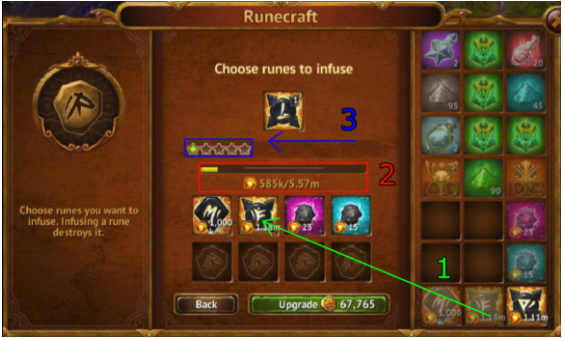
1 - Once the Rune is placed to be upgraded you need to put other Runes or Flawed Runes as fodder in order to upgrade the original Rune.
2 – You will see the bar filled when you use other Runes as fodder. Once this bar is full you can upgrade it to the next Evolution.
3 – This is your Evolution star for the Rune, each time you fill the bar up, you can upgrade the Rune to the next upgrade level.
You can read more about all types of runes in the "Types of runes" article.
Comments
0 comments
Article is closed for comments.